
Automated Semiconductor Metrology for SEM, X-SEM & TEM
The AM (Automated Measurement) module adds advanced semiconductor metrology functions to the Quartz PCI software that automate feature measurements in electron microscope images.
Unlike tools designed for in-line metrology using top view images such as CD-SEMs, PCI-AM is particularly well suited for measuring semiconductor features in cross-section and top view images from SEMs (X-SEM) and TEMs in laboratory, process development and engineering environments. Multiple edge detection techniques are employed depending on the nature and source of the image.
Very little set-up is required before you can be making fast, efficient automatic image measurements.
Semiconductor Features
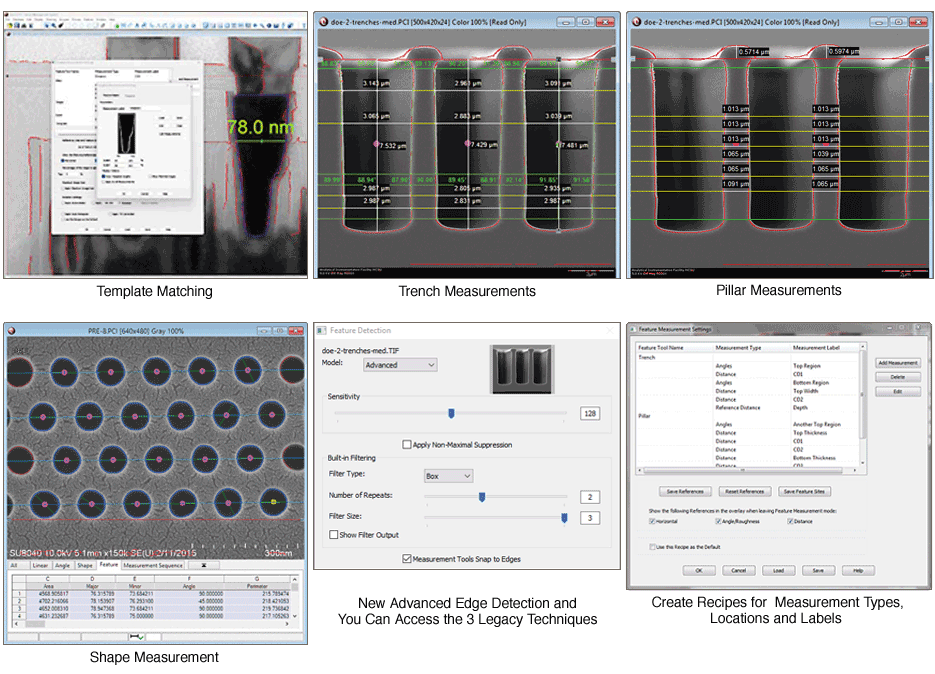
Tools are provided for automatically measuring layers, trenches, pillars, lines, spaces, complex features and 2D shapes, such as contact holes and vias. Within these features, you can measure widths and heights (critical dimensions), sidewall and center angles (in multiple regions), edge roughnesses, line width roughnesses, and other geometric properties.
Edge Detection
Three different edge detection techniques are available allowing analysis of both SEM and TEM images. Noise reduction filtering is also available to improve results with noisy images. A setting is also available that causes the standard Quartz PCI Image Measurement tools to snap to the detected edges.
Four Levels of Automation
The system offers four levels of automation. In the first instance, engineers simply click inside a device feature and the feature is automatically measured in accordance with a "recipe" that has been set up. In the second instance, once multiple features in an initial image have been measured, the same features can be measured in subsequent images with a single click. The system automatically adjusts for misalignment among the images. The third and newest instance is called template matching. You can design templates in our template editor and PCI-AM will find and measure all of the template instances in your images. The fourth instance allows engineers to automatically characterize an entire folder of images.
Benefits of Automatic Semiconductor Metrology
Save Time and More
With PCI-AM, dozens of semiconductor feature measurements on an image can be reduced to a single mouse click, resulting in very significant time savings versus manual measurements. In addition, inaccuracies and inconsistencies among engineers can be reduced. PCI-AM also simplifies data collection and aggregation through its options to export metrology data to spreadsheet files.
Data Collection
The measurement results are displayed on the image and in a spreadsheet grid. The data in the grid can be easily exported into a CSV file suitable for importation into other software such as Microsoft Excel allowing for further statistical analysis. Data from multiple images can be aggregated into a single spreadsheet file. The images and data can also be easily included in standard Quartz PCI reports with just a few clicks.
Custom Development
Quartz Imaging has a long history of providing specialized metrology solutions to the semiconductor industry. If you have unique measurement requirements, we would be delighted to discuss development of a custom metrology solution with you.
Quartz PCI-AM Automated Semiconductor Metrology System: Key Benefits
- Saves time for Engineers
- Ensures more accurate and consistent measurements
- Data export is very easy
- Quick report generation
- We can custom develop for your specific requirements
Frequently Asked Questions (FAQ)
What is Quartz PCI-AM?
Quartz PCI-AM is an optional module for Quartz PCI. It adds AI-driven, automated measurement functionality to the Quartz PCI microscopy software platform.
It automates feature detection, measurement, and data output from SEM and TEM microscope images, replacing time-consuming manual measurement workflows with fast, AI-driven analysis.
PCI-AM is designed for semiconductor metrology, materials analysis, and any laboratory environment where high-volume, repeatable image measurement is required.
The current version is PCI-AM Version 9, released in 2025 alongside Quartz PCI Version 12.
What does PCI-AM do?
PCI-AM automatically detects and measures features in microscopy images using AI-based edge detection. Once configured, it can locate structures, apply a defined set of measurements, flag out-of-tolerance results, and output data to CSV and reports with minimal or no manual intervention per image. Key functions include:
- Automated feature detection and measurement of lines, spaces, trenches, pillars, and 2D shapes in SEM and TEM images
- Template matching: Define a measurement template once; the software locates and measures all matching instances across any number of images automatically
- Batch processing: Apply a saved measurement recipe to entire folders of images in a single unattended run
- Recipe development: Save, reuse, and share measurement configurations across datasets and operators
- Automated reporting: Generate professional reports with images, measurements, and annotations directly from the measurement workflow
What types of features can PCI-AM measure?
PCI-AM supports automated measurement of three primary feature categories, plus a broad set of supporting measurement tools:
Trenches (Spaces) and Pillars (Lines):
- CD (critical dimension) width at fixed positions or relative to the top or bottom of the feature
- Sidewall and center angles
- Line Edge Roughness (LER) and Line Width Roughness (LWR)
- Distances above and below the reference line
- Multiple measurement regions within a single feature
- Pitch
- Top and bottom radius of curvature
- Depth and Height
- Averages across all of the above
Macro Cell:
- Multiple distance measurements in complex features, in arbitrary directions, with a single click
Shapes (2D):
- Area and perimeter
- Aspect ratio
- Major and minor axes
- Collinearity
- X and Y dimensions
- Centroid position
- Ideal shape deviation
- Tilt
Additional measurement capabilities:
- Multi-layer thickness measurement with automatic layer detection
- Arbitrary horizontal and vertical measurements, including equally spaced measurements across a region
- Shortest distance between two edges.
Custom measurement development is also available. Contact Quartz Imaging for specific requirements.
What image types does PCI-AM work with?
PCI-AM is designed primarily for cross-section and top-view SEM images and TEM images. It works with calibrated image files from most major electron microscope manufacturers, including Delong, FEI, Gatan (DM3, DM4), Hitachi, Hitachi CDSEM, JEOL, Phenom, Tescan, ThermoFisher, and Zeiss. Keyence light microscope files are also supported.
For best automated measurement results, images should be acquired in a lossless format such as TIFF, BMP, or PNG. JPEG compression blurs edges and degrades edge detection accuracy.
How does PCI-AM's AI-based edge detection work?
PCI-AM uses an AI-based Advanced Edge Detection model that automatically identifies feature boundaries in microscopy images.
For noisy images, built-in preprocessing filters can reduce noise before edge detection is applied. Users can also adjust sensitivity parameters and apply non-maximal suppression to improve results for specific image types.
In addition to the Advanced model, four legacy edge detection models are retained for images where earlier techniques perform better. The system also supports GPU acceleration: if a compatible graphics card is present, PCI-AM detects and utilizes it automatically to speed up image processing.
What is a PCI-AM measurement recipe?
A measurement recipe is a saved configuration file that defines all parameters for a measurement session: Edge detection model, reference line positions, measurement types and locations, tolerance limits, display options, and template definitions. Recipes ensure that measurements are applied consistently across multiple images and operators.
Once a recipe is developed, it can be saved, reloaded, shared across workstations, and applied in batch processing. This eliminates per-session setup time and enforces measurement uniformity across large datasets or routine inspection workflows.
What is the four-level automation framework in PCI-AM?
PCI-AM structures its automation into four progressive levels, allowing labs to adopt the degree of automation that fits their workflow:
- Level 1 Point and shoot: An analyst clicks inside a feature and PCI-AM automatically measures it.
- Level 2 Single-click for multiple features: Once features in one image are characterized, the same AI-driven measurements are applied to subsequent images with a single click, automatically compensating for misalignment between images.
- Level 3 Template Matching: Using a graphical template editor, analysts define measurement templates. PCI-AM then automatically identifies, aligns, and measures all matching features in individual or batched images.
- Level 4 Fully automated batch mode: Entire folders of images are processed through template matching, batch categorization, and automated reporting with no per-image manual intervention. Results are automatically sorted into Pass, Fail, or Reject output folders.
What is template matching in PCI-AM?
Template matching is PCI-AM's AI-powered feature recognition capability. An analyst draws a template for a feature type using the built-in Template Editor, defines measurement positions on that template, and PCI-AM then searches every image in a dataset to locate all instances of that template, aligns to each one, and performs the specified measurements automatically.
Multiple templates can be added to a single recipe, and template matching for all templates runs simultaneously. The system accommodates size variations of up to ±20% between the template image and the images being processed.
This capability is particularly valuable for high-volume semiconductor inspection, where the same device structure appears across hundreds or thousands of images.
How does PCI-AM batch processing work?
Batch processing allows PCI-AM to apply a saved measurement recipe to an entire folder of images in a single automated run, without requiring an operator to interact with each image individually. The system uses a model image, either the active image or a previously saved file, as the reference for locating features in each image in the input folder.
Batch processing options include:
- Vertical and horizontal alignment of each image against the model
- Auto-resize to match image dimensions to the model while preserving aspect ratio
- Override of recipe settings for a specific batch run (e.g., enabling autorotation for a particular dataset without changing the saved recipe)
- Automatic output subfolder creation to keep results organized and prevent overwriting previous data
Results, including measured images and CSV data files, are written to the specified output folder. The system supports variable image sizes and formats within the same batch, making it suitable for mixed-mode labs using multiple instruments or magnifications.
Can PCI-AM flag measurements that are out of specification?
Yes. Tolerance limits, minimum and maximum acceptable values, can be set for any measurement within a recipe. When a measurement falls outside the specified range, PCI-AM highlights it automatically in the measurement grid on screen and flags it in the CSV output file. Missing measurements can also be flagged or ignored based on user preference.
Color-coded visual feedback on the image provides an immediate indication of out-of-tolerance results without requiring the analyst to review raw data manually.
How does PCI-AM handle image alignment and orientation?
PCI-AM includes automatic image preparation tools that run at the start of each measurement session or batch run:
- Auto-rotation: Automatically orients features horizontally and vertically for consistent measurement alignment, even when source images arrive at slightly different angles
- Tilt correction: Compensates for stage tilt in the source image
- Auto histogram adjustment: Optimizes image contrast and brightness for edge detection before measurement begins
Manual horizontal and vertical reference lines can also be added and positioned by the analyst to anchor measurements to specific structural features in the image.
What data outputs does PCI-AM produce?
PCI-AM outputs measurement data in two primary formats:
- CSV files: All measurement values, labels, and tolerance flags are exported to CSV, which can be opened directly in Microsoft Excel or imported into any data analysis or statistical process control (SPC) system
- Measurement reports: Professional reports combining images with overlaid measurements, labels, tolerances, and annotations, exportable through the Quartz PCI report editor to PDF, Word, or PowerPoint formats
For batch processing runs, measurement data across all processed images is aggregated into a single CSV output file, providing a consolidated dataset ready for downstream analysis.
How much time can PCI-AM save compared to manual measurement?
Based on Quartz Imaging's published analysis, labs using PCI-AM can reduce manual measurement time by up to 90% compared to operator-driven workflows. A skilled analyst spending approximately three minutes per feature manually can achieve the same measurement in seconds using PCI-AM, often in unattended batch mode with no analyst time at all.
For a mid-sized lab processing 330 features per day at a fully burdened labor rate of $45/hour, the estimated annual labor cost saving exceeds $167,000. For most labs, the investment in PCI-AM pays back within months of deployment.
What are the broader business benefits of automated microscopy measurement?
Beyond direct labor savings, PCI-AM delivers several strategic advantages for analytical laboratories and semiconductor fabs:
- Measurement consistency: Algorithm-driven detection eliminates operator-to-operator variability, producing more repeatable and defensible results
- Throughput scalability: The same team can handle significantly higher image volumes without additional headcount as workloads grow
- Faster turnaround: Automated batch analysis reduces the time from image acquisition to reported results
- Staff utilization: Analysts freed from repetitive measurement work can focus on higher-value tasks such as data interpretation, anomaly investigation, and process optimization
- Data traceability: Measurements, labels, and tolerances are embedded directly in image files, creating a complete and auditable record from data capture to final report
Does PCI-AM include all of the standard Quartz PCI functionality?
Yes. PCI-AM is built on the framework of Quartz PCI and comes with all of PCI’s functionality, adding AI-driven automated measurement features.
See PCI FAQ for more details and features.
What are the hardware requirements for PCI-AM?
PCI-AM runs on the same Windows hardware as Quartz PCI (Windows 7, 8, 10, and 11, 32-bit and 64-bit). For high-volume batch processing workloads, PCI-AM can detect and utilize a compatible GPU (graphics processing unit) to accelerate image processing operations. Contact Quartz Imaging for GPU specification guidance if you are configuring a dedicated measurement workstation.
Licensing and Purchasing
How is Quartz PCI-AM sold?
Quartz PCI-AM is sold by subscription. As a subscriber, you receive ongoing access to technical support and periodic updates to the latest version.
What is included in a PCI-AM subscription?
A PCI-AM subscription includes access to the current version of the software, ongoing technical support, and periodic software updates as they are released.
How do I activate Quartz PCI-AM after installation?
If the computer has internet access, activation occurs automatically the first time the software is launched. If automatic activation fails, you can activate manually by saving an Activation Request file and uploading it to Quartz Activation page, or by emailing the file to activate@quartzimaging.com
Can I install PCI-AM on a computer without internet access?
Yes. Manual activation is available. You save the Activation Request file to a USB drive, transfer it to an internet-connected computer, upload it to the Quartz Imaging activation portal, then return the License Key file to the offline computer and load it into PCI-AM.
Technical Support
How do I get technical support for Quartz PCI-AM?
Quartz Imaging provides technical support to all active subscribers. You can contact Quartz Imaging via the support email listed on the Contact page. PCI-AM Version 9 also includes a direct link in the Help menu to Quartz Imaging's technical support AI chatbot, which provides instant answers to common support questions.
Is the technical support AI chatbot included with PCI-AM?
Yes. The Help menu in PCI-AM Version 9 includes a link to Quartz Imaging's technical support AI chatbot. The chatbot is continuously updated with the latest product information.